
To equip a learned spell in the recorded keyboard-and-mouse layout, open the character menu, select the top-row Spells tab, drag the spell from the collection onto one of the five slots at the bottom, then close the menu and check the combat bar. The example below replaces Aetherfang Phalanx with Flaming Strike in the slot labeled F.
Layout scope: these exact actions are visible in a September 11 preview recording of eDev 0.107.7515. They have not been tested here in the current Early Access client. F is that recording's slot binding. If your menu differs, identify the learned-spell collection and active slots by their labels and icons; this example does not establish a new menu shortcut or a controller sequence.
Equip a learned spell through the Spells tab
Use these steps when the spell already appears in your collection. If you only have a recipe or an unlearned book, complete the acquisition and requirement checks further down first.
- Open the character menu using your configured menu control. In the recorded layout, Character, Codex, Quest, Map, Skill Tree, Spells, Social and Settings share the top navigation. The recording shows the menu opening, but does not identify which physical key opened it.
- Select Spells in that top row. It sits between Skill Tree and Social. The large named icons form the collection; the five smaller positions at the bottom form the active loadout. Selecting a node on Skill Tree is a separate action.
- Locate the learned spell by name. The example uses Flaming Strike, the orange ring-shaped icon. Hovering it displays its description and requirements. Check the name instead of assuming that every flame-colored icon is the same spell.
- Drag that icon onto the intended bottom slot and release it there. In the example, Flaming Strike is carried down to the fourth slot from the left, labeled F, which previously held the purple Aetherfang Phalanx icon. This is a replacement in an already full five-slot bar.
- Close the menu and inspect the combat HUD. Flaming Strike's orange icon now occupies F on the lower-right bar. That changed combat icon is the confirmation shown in the recording; no separate confirmation dialog appears. Use the binding displayed in your own slot to test it with sufficient resources.
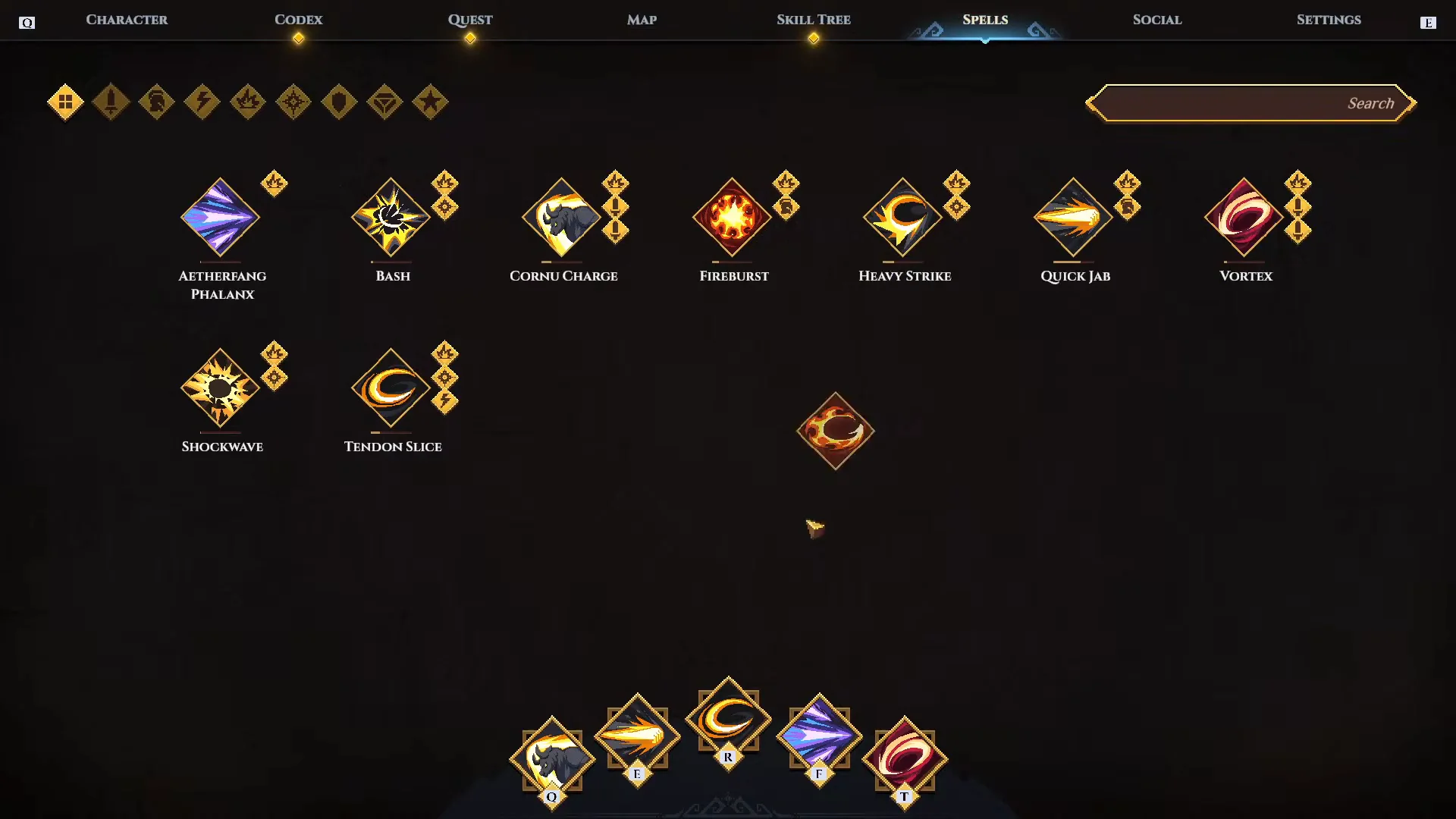
Assignment target: the fourth bottom slot, marked F, beneath the purple icon. Flaming Strike is being carried down from the collection toward that position. This layout is from preview build eDev 0.107.7515.
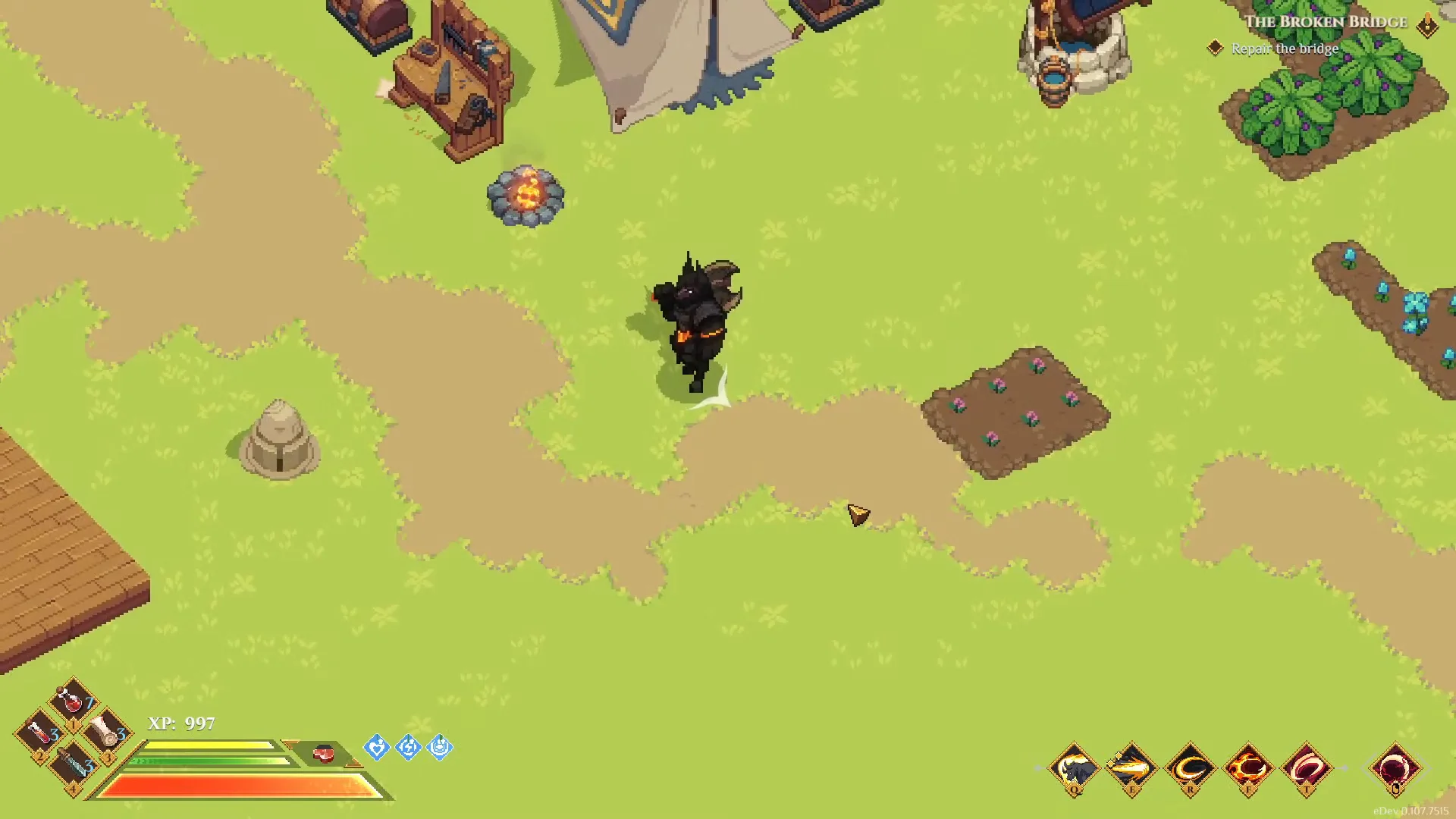
Result after closing the menu: the lower-right F slot contains the orange Flaming Strike icon. The build identifier eDev 0.107.7515 is visible at the bottom right. The following action in the recording uses the newly assigned spell.
The recorded menu briefly retains the previous slot illustration during the change. The combat HUD after closing the menu, and the collection when reopened later, show the new assignment. Check the final combat bar before repeating the drag or deciding that learning failed. This is an observation about that preview, not a claim that every current UI has a refresh problem.
Distinguish the collection from the active bar
The large upper collection answers which spells are available to select. The smaller bottom loadout answers which five actions are assigned. An icon in the first area is not proof that it occupies a position in the second. This is the distinction to check when a book appears to have worked but pressing a combat key still activates the old action.
In this example, the bar is already full before the change. Cornu Charge, Quick Jab, Tendon Slice, Aetherfang Phalanx and Vortex occupy the five positions. The player replaces Aetherfang Phalanx; they do not unlock another slot, remove a skill-tree node or craft a second copy of Flaming Strike. These names describe the before-and-after recording, not a recommended five-spell build.
Aetherfang Phalanx remains visible in the collection after replacement. Changing the active selection has not erased the learned option in this example. This matters when comparing a newly acquired spell with a familiar action: the operation shown changes what is on the bar, rather than demonstrating a permanent deletion of the old spell.
If your collection looks different, check its category filters and search field. The recorded Spells screen places filters near the upper left and Search near the upper right. A filtered collection may hide the entry you are looking for. Clear the search and return to the broad collection view before diagnosing a missing learned spell.
Keep menu navigation prompts separate from combat bindings. The top navigation also displays Q and E at its edges, while the active bar has its own Q, E, R, F and T labels in this recording. Their location tells you which interface element they refer to. An edge prompt for moving between menu tabs is not an instruction to assign the highlighted spell to that combat slot.
For a controller or a rebound layout, the recording does not establish a button-for-button equivalent. Use the displayed selection and slot controls for that layout, then verify the resulting combat icon. Do not copy F from this example unless your own bar labels that position F. The mouse demonstration establishes the destination and visible result; it does not establish current default bindings for every input device.
Recipe, book and learned spell
A spell recipe describes something that can be crafted. It does not mean the resulting spell is already ready to equip. Check the item's name and description when it arrives in your inventory, particularly after an exploration pickup or quest interaction.
| What you have | What it establishes | Next useful check |
|---|---|---|
| A spellbook recipe | Access to a crafting option | Crafting service, materials and output |
| A finished spellbook | The book has been obtained | Learning requirements and the learning interaction |
| A learned spell | The spell belongs to your collection | Active slot assignment |
| A spell icon on the active bar | The action is assigned | Binding, cost and casting behaviour |
| A triggered equipment effect | Gear can produce an effect under its conditions | Set pieces and trigger requirements |
Crafted world spellbooks can broaden a character beyond the spells native to its race and class. Their attribute requirements still apply. Brawler does not mean unable to learn every spell, and Mage does not mean automatically eligible for every book.
Spellbook services can also differ between NPCs and stages of world progression. If the recipe is available but its crafting service is not, inspect recruitment and quest progress in the world you are visiting. A service unlocked in a friend's established world is not proof that the corresponding NPC is already available in your own.
Use the Dimraeth recipes guide if the process stops before you have the finished book. It separates recipe discovery, materials, stations and recruited services, which helps avoid treating every blocked craft as a spell-equipment problem.
Attribute requirements before learning
Read every listed attribute requirement on the book. Meeting one does not satisfy another. A character with substantial combat investment may still fall short of a utility or elemental spell's particular requirements.
Flaming Strike provides a concrete preview example. Its tooltip in eDev 0.107.7515 lists three requirements: 7 Memory, 8 Adventure and 7 Energy. The character shown has met all three before the assignment demonstrated above. Check all three attribute rows in the tooltip before trying to learn the spell. These numbers apply to the recorded build. Compare every requirement displayed in your installed version before spending experience.
If you need additional attributes, remember that Dimraeth's progression involves training attributes with earned experience. Having earned experience is not the same as having spent it on the attribute the spell requires. Return to the appropriate training interaction, read the cost and choose deliberately.
Before training only to unlock a book, consider whether it earns a place in the five-slot loadout. A useful spell can justify an off-path requirement; an attractive icon you will never equip may not. Compare its purpose with an action you already have, then decide whether the extra attribute investment addresses a real gap.
The Dimraeth character creation guide explains the relationship between race, class and attribute-training costs. Those choices affect progression, but they do not turn a book's displayed requirement into an optional suggestion.
Check a replacement before the next fight
Replacing a spell changes the action associated with that slot. In the demonstration, pressing the input for F after leaving the menu can no longer be treated as a request for Aetherfang Phalanx. First read the new action's casting description, then test the new assignment where you have room to observe it.
The recording's Flaming Strike tooltip describes holding to charge and releasing to strike. A short tap and a full charge therefore should not be treated as the same test. The description also names an interaction with attacking after a fully charged strike. That follow-up belongs to the action's behavior; it is not another menu confirmation needed to equip it.
Change one slot at a time when troubleshooting. If you change the spell, its modifier and several bindings together, an unexpected result becomes harder to identify. Start by verifying the icon, then the button, then the way the action is pressed or held. Only after those checks does it make sense to compare how well it fits the rest of your combat sequence.
If the old spell supplied movement or a resource effect, account for losing that function. A correctly equipped replacement can still make an existing sequence less useful. The question at this point is whether the new action works when requested, rather than whether it is stronger in every encounter.
Spell modifiers belong to the selected action
Modifiers can change how a spell functions. They are not all additive bonuses that can necessarily be selected together. Choices can be exclusive within an aspect, so inspect what the selected option replaces as well as what it adds.
Fireball illustrates this clearly. Charging, piercing, rapid casting and consuming Burning describe different behaviours. Do not assume that selecting one grants all of the others. A build that calls for a particular modifier is asking for that behaviour, not just any spell with Fireball in its name.
After changing a modifier, retest the action. Its useful timing or role may have changed. A spell that once fit between quick attacks might now ask for a longer commitment. A status consumer may now belong later in a sequence, after another action has built the stacks.
The Dimraeth skill-tree explanation covers race, class and archetype contributions. That distinction helps when two characters possess a similar spell but cannot follow the same branch or choose the same surrounding passives.
Press, charge and channel inputs
Some spells activate with a press, others charge while held, and others channel. Read the action description before diagnosing a brief tap as a failed cast. A correctly equipped spell can still produce the wrong result when used with the wrong input pattern.
Heavy Strike is a useful example of why timing matters: its described behaviour involves charging and releasing, with a further interaction after a full charge. It should not be treated as interchangeable with a simple instant attack merely because both occupy an active slot.
For a charged action, practise the hold and release where you have room. Watch the character and resource feedback rather than repeatedly pressing the button faster. For a channel, recognise that remaining committed can expose you to an incoming attack. Stop trying to complete a damage sequence when repositioning is the safer decision.
Controller combinations deserve a separate check. Rebinding Weapon Swap or another skill can change the button you expect to activate. Read the current slot prompt after rebinding and confirm it with a test. A layout shown for another player is an example, not a universal default.
A slotted spell that will not cast
Once the correct icon is on the active bar, diagnose casting separately from learning. Start with the displayed cost and the resource currently available. Do not assume every skill uses only Concentration or that a full health bar guarantees sufficient casting resources.
Basic attacks that hit restore Concentration during combat. Swinging into empty space does not meet the hit condition. A skill dealing physical damage is also not automatically the basic attack used for that recovery loop. If repeated casting has emptied the bar, create an opening for ordinary weapon hits rather than continuing to press an unaffordable spell.
Human Weapon Swap is an action on the spell bar. Check its displayed resource cost in your installed version instead of assuming that a weapon change is free or that every action uses the same resource. Moving its slot changes where you activate it; it does not by itself change the action's cost or behavior.
Some actions have additional costs or charges. A skill failing because of an insufficient life cost is a different issue from a skill that has not finished charging. Read the individual action and its current indicator before changing attributes or replacing the entire loadout.
| What you observe | Inspect next |
|---|---|
| No spell in the collection | Recipe versus book, learning and active filters |
| Spell is visible but not on the bar | Slot assignment |
| Wrong action activates | Current binding and the icon in that slot |
| Quick taps produce an unexpected result | Press, hold or channel behaviour |
| Repeated casts stop working | Resource cost, remaining resource, cooldown or charges shown by the action |
| Basic attacks do not appear to help | Whether those attacks actually hit a target |
| Effect vanished after replacing gear | Set count and triggered-effect requirements |
Equipment effects and the active bar
Some equipment sets grant triggered spell effects. These are not evidence of a sixth manually equipped slot. The effect occurs through the equipment's stated condition, which can disappear when the required set pieces are no longer worn.
If you see an effect during combat but cannot find an assigned button for it, inspect your equipment and active set bonuses. Conversely, if removing a piece makes an effect disappear, check the set before deciding that the spellbook was lost.
This distinction also keeps build advice understandable. “Equip this spell” should refer to an active action; “wear enough pieces to trigger this effect” refers to an equipment condition. Both can contribute to combat, but they ask you to change different parts of the character.
Prepare the loadout before combat
Set up spells and combat items while safe. Backpack access can be restricted during combat, and planning around a mid-fight inventory change adds an avoidable failure point. Confirm the spell bar, the inputs you will use and the items you intend to carry into the next encounter.
Rest when appropriate and check consumable charges, then try the opening sequence once. Make sure your recovery action is still available after your recent changes. If a new spell displaced your movement tool or resource generator, fix that before testing the loadout against a difficult boss.
The final check is simple: you know what each slot does, what it costs, how to activate it and why it belongs beside the other four. That is enough to begin using a new spell without confusing acquisition, learning, equipment and combat execution.
If a learned and equipped spell still cannot be cast, follow the Dimraeth Concentration recovery guide to separate missed basic attacks, resource costs and input problems.